Arranging a Live Looping Song in Advance: Let the Song Press the Buttons
Live looping with a pedal is immediate. It is also a lot of footwork. A song with four tracks, a few overdubs and a breakdown can mean a dozen precisely timed presses, and one late stomp shifts the whole loop.
The alternative is to plan the presses ahead of time. You decide that track 1 records bars 1 to 4, track 2 records bars 5 to 8, track 1 plays from bar 5 to the bridge, and the reverb opens up in the last chorus. Then the software fires those commands at the right bars while you play the parts.
That is what the arrange view in LOOM is for. The full reference is the manual's arrange view chapter.
Can a looper play an arrangement by itself?
A hardware looper needs an external sequencer sending it MIDI to do this. LOOM's arrange view drives the same looper engine you play by hand. A region on the timeline fires the same command a press on the track's ring would fire. So a song you build by hand at rehearsal translates directly into an arrangement, and anything you know about the looper still holds. A good way to work is to sketch the loops by hand in the looper view first, then pin down the button presses and effect changes in the arrange view.
The three verbs: REC, DUB and PLAY
Each track gets a lane, instrument tracks included. You draw regions on a lane, and each region carries one of three verbs:
| Region | What happens at its start |
|---|---|
REC |
The track starts recording. |
DUB |
The track starts an overdub over what it already holds. |
PLAY |
The track starts playing what it already holds. |
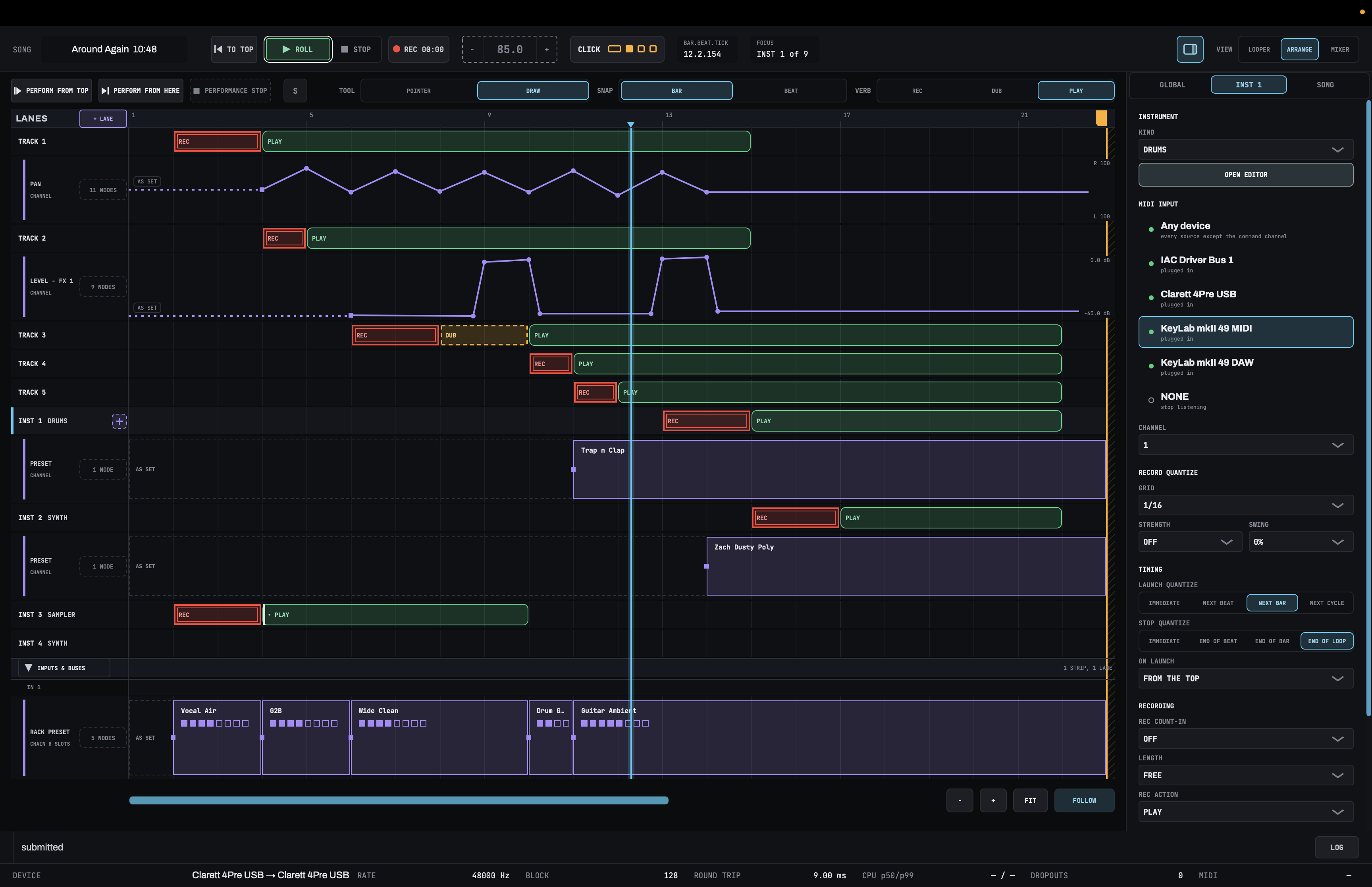
There is no stop region. A stretch of lane with no region on it means stopped: LOOM stops a track at the end of each of its regions, so the track is silent in the space between two of them. A track with no regions plays nothing for the whole song.
Regions fire on their own tick, to the sample. A DUB region on beat 3 of bar 7 starts its overdub on beat 3 of bar 7, and you press nothing.
What a REC region does to an existing loop
A REC region on a track that already holds a loop re-records it, and the new take is the region's length. A 2-bar REC region over a 4-bar loop leaves you a 2-bar loop. That replacement is permanent once the region fires, and on purpose: it lets the arrangement set each track's loop length. UNDO cannot bring back the take it replaced. Until the region fires, it is an ordinary edit you can move, delete or change to DUB.
A DUB region adds a layer you can undo, the same as an overdub played by hand. Two DUB regions back to back make two layers and two undo steps.
Planning a song: a worked example
Say you want a song built from a guitar loop, a bass loop and a drum pattern, with a vocal on top. A plan might look like this:
- Bars 1 to 4:
RECon track 1 for the guitar part. - Bars 5 to 8:
PLAYon track 1,RECon track 2 for bass. - Bars 9 to 24:
PLAYon tracks 1 and 2, andPLAYon an instrument track holding a drum pattern. - Bars 25 to 28: nothing on tracks 1 and 2, so they stop for a breakdown. The drums keep going.
- Bars 29 to the end:
PLAYon everything again, and aDUBregion on track 1 to add a second guitar layer in the last chorus.
You sing over all of it, and your hands stay on the guitar.
Drawing it
Open the arrange view with ⌘2. Set VERB in the header row to REC, DUB or PLAY, then draw on a track's lane. With TOOL on DRAW, a drag on an empty lane makes a region. SNAP rounds to the BAR or the BEAT.
Drag a region to move it, drag an edge to trim it, and right-click it to change its verb. The arrangement has its own undo on ⌘Z.
You can also build it from the keyboard: on a lane, Return makes a one-bar region, and LOOM announces each edit, so the arrange view works with VoiceOver.
Set the tempo first
An arrangement fires against the song's bar grid, so the grid has to exist before you perform. Type a tempo in the top bar before you record anything. The tempo field locks once a track holds a loop.
The arrangement also has to stay inside one tempo and meter.
Give bar 1 a count-in
If your first region records at bar 1, set SONG COUNT-IN on the side panel's SONG tab. PERFORM FROM TOP then starts before bar 1 and plays through it, so the first recording gets its lead and you get a bar to breathe. Without it, a region recording at bar 1 loses the first few milliseconds to latency, and the notice line tells you so.
Automation: let the song work the mixer too
Below the track lanes, automation lanes move one control each while the arrangement performs. You draw nodes on them the same way you draw regions.
You can automate:
- any strip's level on each of its four fader destinations (
MAIN,CUE,FX 1andFX 2), its pan and its mute; - each effect slot's bypass;
- an effect's controls, such as the reverb's
WETor an EQ band's gain; - the controls on an instrument track's synth, drum machine or sampler.
A node can jump or ramp to the next one, so a reverb can swell across a bar or snap open on the downbeat.
One practical use: if a vocal mic is open beside you while you record a drum take, a lane on the mic's mute can drop it for the take and bring it back before you sing.
Rack and preset lanes: name the sections of the song
A rack lane loads a saved rack, a whole effects chain, into a strip at the bar you choose. A preset lane loads a saved preset into one slot. On an instrument track, a preset lane can load a synth preset or drum kit, and a pattern lane can change the drum pattern.
Each change is a node, and the band after it carries the name of what is loaded until the next change. So the lane reads as a row of named sections: a clean verse rack, a heavier chorus rack, a dub breakdown. You can read the song's structure off the screen.

A node keeps its own copy of the settings. If you later edit or delete that preset in your library, every song that used it still sounds the way it did.
How precise automation is
Regions fire to the sample. Automation is a little looser: a node lands within about 50 milliseconds of the bar you drew it on, which is fine for switching an effect on a downbeat. A level ramp of a bar or longer is heard as a smooth fade.
Performing the arrangement
The header row has three buttons:
PERFORM FROM TOPplays the arrangement from bar 1.⇧Returnpresses it from the keyboard, and MIDI note 125 presses it from a pad or footswitch in any view.PERFORM FROM HEREplays it from wherever you placed the playhead, which is how you rehearse the bridge without playing the whole song.PERFORMANCE STOPlets go of the arrangement and leaves everything playing.

That last one is the escape hatch. If the song is going well and you want to stretch the outro, press PERFORMANCE STOP. The transport keeps rolling, every loop keeps playing, and from that moment you run the looper by hand. To pick the arrangement back up, press STOP and then PERFORM FROM HERE.
You can also click a bar in the ruler while the song plays, and the song jumps there on the next bar line, with the arrangement following.
When a performance ends, every automated control stays where the lane left it. Nothing snaps back, so what you hear after you stop is what you heard before.
If something is wrong, nothing starts
LOOM will not perform an arrangement it cannot play correctly. If any region has a problem, nothing starts, and the notice line lists each problem on its own line with what to fix. You find out at soundcheck, not halfway through the song.
When to arrange and when to loop by hand
An arrangement suits songs you play the same way every night. Looping by hand suits improvisation. You do not have to choose per song, because PERFORMANCE STOP hands control back to you at any point.
If you record your sets, an arrangement also makes performances line up with each other, which makes recording a looping set as separate stems more useful. For a look at how LOOM compares with other Mac loopers, see the best live looping software for Mac in 2026.
Frequently asked questions
What does a gap between regions do?
It stops the track. There is no stop region. LOOM stops a track at the end of each region, so the track is silent until its next region starts.
Can I improvise in the middle of an arranged song?
Yes. Press PERFORMANCE STOP and the arrangement lets go while the transport and every loop keep playing. Press STOP, then PERFORM FROM HERE, to resume the arrangement from where you are.
Can a MIDI pedal start the arrangement?
Yes. MIDI note 125 on LOOM's command channel (16 by default) is PERFORM FROM TOP, and it works from any view.
Does automation run when I just press play?
No. Automation and regions run only while the arrangement performs, through PERFORM FROM TOP or PERFORM FROM HERE. ROLL on its own fires nothing.
Can the arrangement change effects presets mid-song?
Yes. A rack lane loads a whole saved effects chain at the bar you choose, and a preset lane loads one effect's preset into one slot.