Best Live Looping Software for Mac in 2026
I build a live looper for the Mac, LOOM, so read this with that in mind. I have tried to be fair to the other options, and every price and feature below comes from the product's own page, checked in October 2026. Where another tool is the better choice for you, I say so.
Live looping software for the Mac falls into three groups. There are DAWs with looping built in, dedicated looper apps, and plug-in hosts for live performance that can loop with the right plug-in. Which one suits you depends on how you perform.
What to look for in live looping software
Before comparing products, decide what you actually need:
- Foot and pad control. Can you run it from a MIDI foot controller or pad controller? Does it need a custom mapping, or is there a fixed layout?
- Plug-in hosting. Do you need your own AU or VST instruments and effects inside the looper?
- Hands-free performance. Does every record and overdub need a press from you, or can the software run the looping moves while you just play?
- Stability on stage. What happens to the show if one part of the rig misbehaves?
- Recording. Can you capture the set as separate tracks for mixing later?
- Platform and price. Mac, iPad, one-time, subscription or free?
Ableton Live
Ableton Live is the tool most people try first, and for good reason. Its Session view lets you play clips "at any time and in any order", which Ableton describes as suited to live performance where the order of parts is not known in advance. You can record a Session performance into the Arrangement, which logs the clips you launched.
Live also includes a Looper audio effect in every edition. Ableton describes it as one that "records, loops and overdubs audio, based on classic hardware looping pedals."
Where it is better: Live is a full DAW. It hosts VST2, VST3 and Audio Unit plug-ins in every edition, and it is the deepest tool here for production after the gig.
Where it is weaker for looping: you build the looping workflow yourself out of clips, the Looper device and controller mappings. Having Live run the looper for you during a song takes more again: a MIDI track that sends notes out through a virtual MIDI port and back into Live, each note mapped to a clip's record or launch control, and a piano roll where you have to remember which note does what. It works, and it is a lot to build and keep working. Live 12 Intro is also limited to 16 audio and MIDI tracks and 16 scenes.
Price: Live 12 Intro is $99, Standard is $349 and Suite is $749. It requires macOS 11 Big Sur or later.
Logic Pro and Live Loops
Logic Pro's Live Loops feature gives you, in Apple's words, "a grid of loops and phrases you can trigger and experiment with unique arrangements on the fly." Logic also runs third-party Audio Units instruments and effects.
Where it is better: if you already produce in Logic, Live Loops keeps sketching, performing and mixing in one app, with Apple's large instrument and effects library behind it.
Where it is weaker for looping: Live Loops is a grid of cells inside a DAW rather than a looper built around the record-overdub-play cycle of a pedal.
Price: Logic Pro for Mac is $199.99 as a standalone app. It is also included in Apple Creator Studio at $12.99 per month or $129 per year. The Mac App Store listing requires macOS 15.4 or later.
MainStage
MainStage is Apple's live performance app: a full-screen interface for playing instruments and effects on stage, with support for Audio Units plug-ins. It includes a Loopback plug-in for looping. MainStage is $29.99 standalone and is also part of Apple Creator Studio.
Where it is better: it is the cheapest way to host your own AU instruments and effects on stage, and looping is one plug-in among many.
Where it is weaker for looping: it is a performance host first. You build the looping rig yourself.
Gig Performer
Gig Performer is a plug-in host for live performance, supporting VST2, VST3 and AU. It is a host rather than a dedicated looper. If your live rig is a set of plug-in instruments and effects that changes per song, it is a strong host. It costs $169 for macOS and has a 14-day trial.
SooperLooper
SooperLooper is a free, open source looper (GPL-2.0) controllable by MIDI and OSC, with support for MIDI foot pedals. Its site lists "multiple simultaneous multi-channel loops limited only by your computer's available memory", and the Mac build runs as a standalone app or as an AU plug-in.
Where it is better: it costs nothing, and it is a looper first. If you want classic looping and are comfortable configuring it, it is worth trying.
What to know: the most recent release listed on its site is version 1.7.9 from July 2023, a universal build for Intel and Apple Silicon.
Möbius 3
The original Möbius came out in the 2000s as a free Windows looper, and Möbius 3 is its return. The official site describes it as "available as an early release for 64-bit Windows and Mac computers", running as a standalone application and as a VST3 and Audio Unit plug-in. It is free, and its documentation is described as incomplete.
Where it is better: a free, deep looper that runs inside your DAW or host as a plug-in.
What to know: it is an early release, so plan for rough edges.
Loopy Pro
Loopy Pro is the best-known looper on iPhone and iPad. It hosts AUv3 plug-ins, takes MIDI control and can record stems. It is a free download with a $29.99 unlock and an optional $14.99 upgrade later, with no subscription.
On the Mac: the native Mac version is not out yet. Its developer's page says it is "still under development, but it is getting close", with "no release date yet", and that it is planned as a separate purchase. If you perform from an iPad, Loopy Pro is the obvious choice. If you need a Mac looper today, it is not one yet.
Hardware: Boss RC-505mkII
A tabletop looper is the contrast case. The Boss RC-505mkII has five simultaneous stereo tracks, 49 input FX types and 53 track FX types, 99 memories, and over 200 rhythm patterns. You get dedicated buttons and no laptop to boot. You give up a screen and a timeline.
LOOM
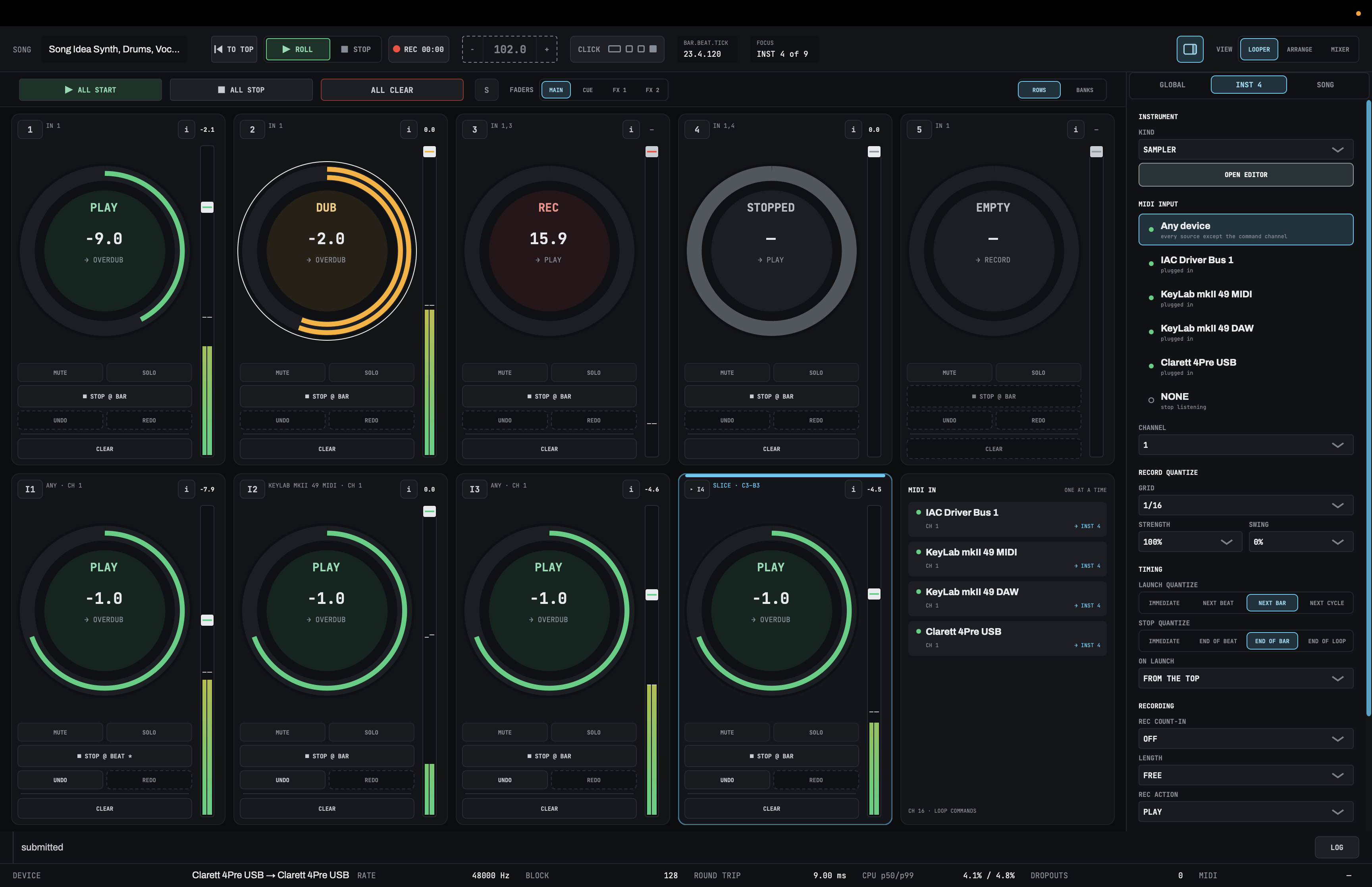
LOOM is the looper I build. It is a live looper for the Mac with five audio loop tracks you play like a hardware looper, plus four instrument tracks that play its own synth, drum machine and sampler from MIDI.
Hands-free looping: the song runs the looper
Every other tool here has you operate the looper while you perform, with your hands or your feet. LOOM can take that job off you. In the arrange view you draw REC, DUB and PLAY regions on a timeline, add automation lanes for the mixer, the effects and the instruments, and press PERFORM FROM TOP. From then on the song presses its own buttons. You can move from guitar to keys to vocals without touching the looper, and the audience watches you play instead of watching you work a pedalboard.
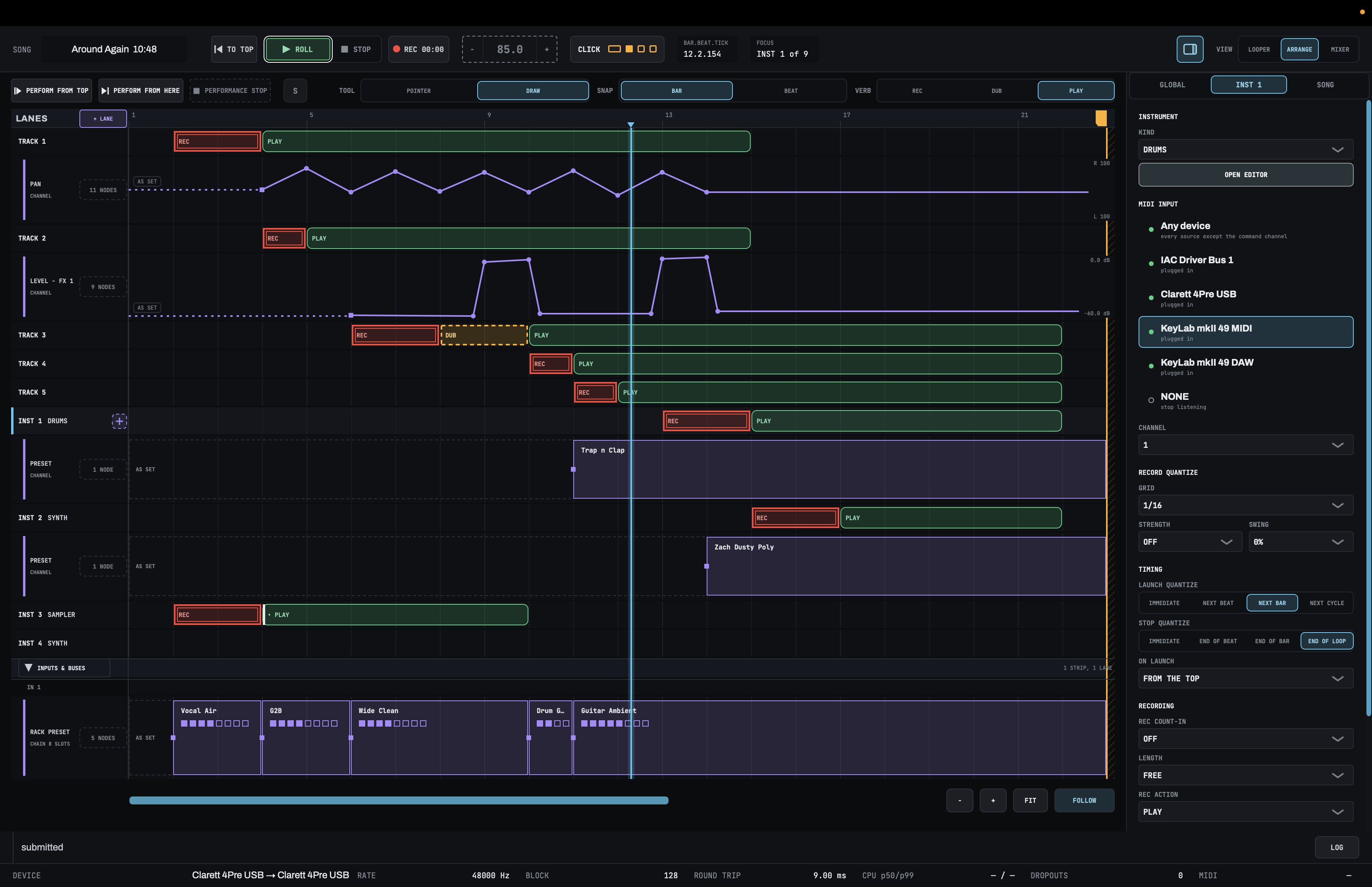
The arrangement drives the same engine as the looper, so a region does exactly what a press of the track's ring button would. When you want to loop by hand, LOOM also has a fixed MIDI note map for every track and the transport, so a foot controller or pad controller works too, and PERFORMANCE STOP hands the song back to you at any point. There are separate guides on arranging a live looping song in advance and setting up a foot controller or pad controller.
Instruments and effects built for the stage
Everything you can put in a LOOM chain is LOOM's own: the synth, drum machine and sampler, and the parametric EQ, compressor, delay, reverb, noise gate, chorus, octave, cab and guitar amp. That is a deliberate choice for live use. A third-party plug-in runs inside the app that hosts it, so a plug-in that crashes takes the whole app down with it, mid-song, and one that grabs memory or CPU at the wrong moment causes a dropout.
Because LOOM owns all of the code that makes sound, it decides exactly how much memory and processing each part uses. Its audio code never allocates memory, waits on a lock or touches the disk while it plays, and LOOM's tests run under a real-time sanitizer that flags any code that does. If your sound depends on one particular plug-in, a plug-in host such as MainStage or Gig Performer is the better home for it.
The rest:
- A mixer with eight insert slots per strip. Presets and whole racks of effects can load from the arrangement mid-song.
- Performance recording to separate WAV files: one per loop track, instrument track and effects bus, plus the main mix and groups of live inputs, all starting in sync. See how to record a looping set as stems.
- No network code. It never connects to the internet, and the licence is checked on your Mac.
What it does not do yet: there is no piano roll, no MIDI output and no MIDI clock in or out, and the MIDI note map is fixed, with no MIDI learn yet. It runs on Apple Silicon Macs only, with macOS 13.3 or later, and there is no iPad version.
Price: a one-time licence at $149.99, with a launch price of $99 until October 31, 2026. There is a 14-day trial with every feature unlocked.
Which one should you pick?
- You want a full DAW and your own plug-ins: Ableton Live or Logic Pro.
- You want a cheap stage host for AU plug-ins: MainStage. For a cross-platform host, Gig Performer.
- You want a free looper and do not mind setup: SooperLooper or Möbius 3.
- You perform from an iPad: Loopy Pro.
- You want physical controls and no computer: a hardware looper like the RC-505mkII.
- You want the song to run the looper while you play every part: try LOOM.
Frequently asked questions
Is there a free live looper for Mac?
Yes. SooperLooper is free and open source, and Möbius 3 is free as an early release. Both run as standalone apps and as Audio Unit plug-ins.
Does Loopy Pro run on Mac?
Not natively yet. As of October 2026, the developer's Mac page says the Mac version is still in development, with no release date, and is planned as a separate purchase.
Can Ableton Live be used as a looper?
Yes. Every edition of Live 12 includes the Looper effect, and Session view lets you launch and record clips in any order during a performance.
Can you live loop on a Mac without touching the looper?
Yes, in LOOM. Draw the song's REC, DUB and PLAY moves in the arrange view and press PERFORM FROM TOP, and the song runs the looper while you play. In Ableton Live you can build something similar with a MIDI track routed back into Live through a virtual MIDI port and mapped to clip controls.
Why does LOOM use only its own instruments and effects?
For stability on stage. A plug-in runs inside the app that hosts it, so a crash or a CPU spike in someone else's code can stop the show. Because every instrument and effect in LOOM is its own, it controls the memory and processing every sound uses.
Does live looping software need an internet connection?
It depends on the product. Ableton lists internet access for authorization among Live's requirements. LOOM makes no network calls at all, so it runs at a venue with no Wi-Fi.