Record and overdub on five audio tracks like you would on a hardware looper, and loop a synth, drums and a sampler on four more. Then draw the same moves on a timeline, and the song presses its own buttons while you play. It’s one engine underneath, so everything you learn looping live works the same way in the arrangement.
Latest (1.5.1) · 27.6 MB · 14-day free trial $99 launch price until December 31, then $149.99 · one-time Apple Silicon · macOS 13.3+ · all versions
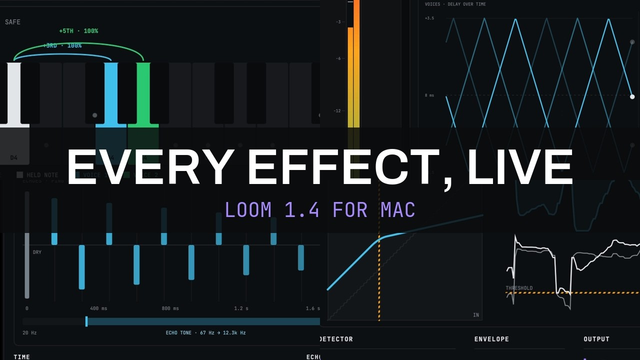
WHAT'S NEW IN 1.4 · 1 MIN
WATCH THE FULL OVERVIEW · 31 MIN
WATCH THE DEMO
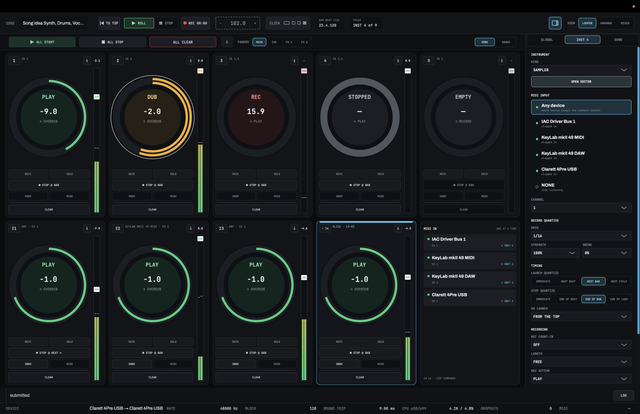
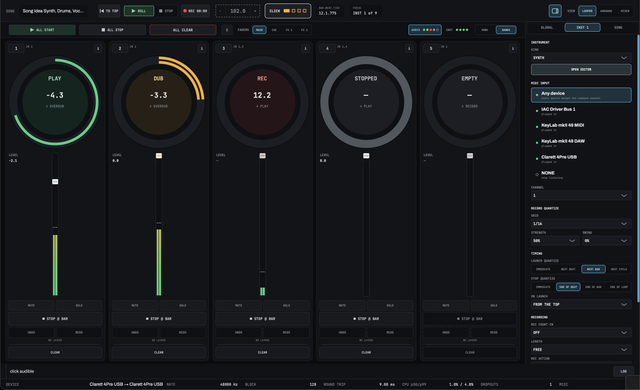
LOOPER · FIVE AUDIO TRACKS AND FOUR INSTRUMENT TRACKS · EACH RING SHOWS WHAT YOUR NEXT PRESS WILL DO
ONE PRESS
No arming
The centre of each ring shows what your next press will do. You don’t arm a track first, and there’s no separate play button to find.
THE GRID FOLLOWS YOU
Your first loop sets the tempo
Record a free-length loop with quantize off and LOOM works out the tempo from what you played. The transport keeps rolling, and you don’t press anything extra.
EVERY STATE
Readable without colour
Each ring state has its own arc pattern as well as its own colour. A wedge marks a command that’s queued and waiting to happen.
SAMPLE-ACCURATE
Same engine both ways
The loop station and the arrangement drive the same engine. A region on the timeline does exactly what your hands would have done.
WHY LOOM
The last app that did this isn’t around anymore.
There used to be a live-looping-first application where an arrangement could play a looper for you. But it was discontinued years ago. Everything else makes you pick the immediacy of a loop pedal, the structure of a timeline, or trying to force a DAW to behave like a looper.
LOOM gives you both and keeps the hardware-looper experience a first-class citizen. Press a ring button and it records. Draw the same command on a lane and it fires exactly where you drew it.
INSTRUMENTS
Loop a synth, drums and a sampler via MIDI
Four instrument tracks sit beside the five audio tracks. Each one plays LOOM’s own synth, drum machine or sampler from a MIDI keyboard or pad controller, with the same ring, STOP, UNDO and CLEAR as an audio track.
LOOM loops the notes, not the sound. Change the preset, the kit or any setting while the loop plays, and the loop plays on with the new sound. You never have to play the part again to hear it on a different instrument.
SYNTH · EVERY CONTROL ON ONE PAGE, EVERY PICTURE LIVE
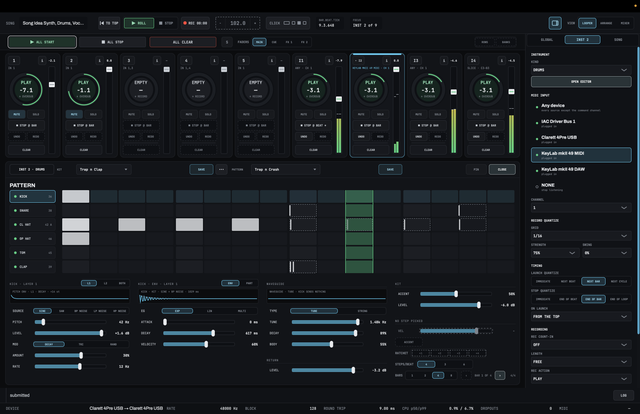
DRUM MACHINE · THE GRID IS THE LOOP ITSELF
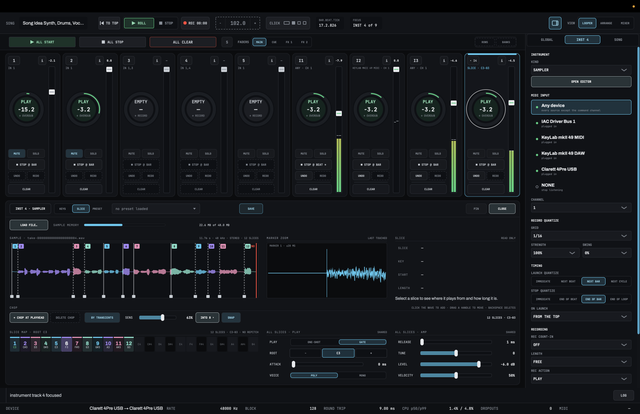
SAMPLER · SLICE A TAKE AND PLAY IT FROM THE KEYS
SYNTH
Two oscillators, a filter and an arpeggiator
Two oscillators with a sub and noise, a filter with four types and its own envelope, two LFOs, glide, unison of up to four voices with detune and stereo spread, and an arpeggiator that steps on the song’s grid. Each step can play one held note, several, or the whole chord, and STRUM spreads them out like a strummed guitar. In full screen every control and a picture of each oscillator, envelope and LFO fit in one view.
DRUM MACHINE
The grid is the loop itself
Hits you play on pads show up in the step grid, and steps you click play in the loop, even while it plays. Each step has its own velocity, accent and ratchet. Set the loop to 1, 2, 4 or 8 bars, and a longer loop starts as a copy of the first. Each drum layers two sounds, from a sine or saw to filtered noise, and can ring through a tube or string resonator.
SAMPLER
Chop a sample and play it from the keys
Load a WAV or AIFF and play it across the keys, or switch to SLICE and LOOM cuts it at its transients, one slice per key. Click a slice to hear it, and chop again right where you heard it. MONO makes each slice cut off the last, which is what you want for vocal chops.
RECORD QUANTIZE
Quantize you can take back
LOOM keeps each take exactly as you played it and quantizes from that while the loop plays. Tighten a loose take after you record it, or set STRENGTH to OFF to hear it the way you played it.
PASS BY PASS
Undo every overdub, one at a time
Each overdub on an instrument track is its own pass. UNDO takes them off one at a time, back to the first take, and REDO puts them back.
MIDI INPUTS
Pads on one channel, keys on another
Each instrument track picks its own device and channel, so pads on channel 10 can play the drums while the keys play the synth. An audio track can also record an instrument, which turns a MIDI loop into audio.
LOOM’s instruments are its own: 3rd party plug-ins are not supported for stability. There is not currently a piano roll, no MIDI file import or export and no MIDI output.
LOOPER · BANKS LAYOUT · AUDIO OR INSTRUMENT TRACKS AT FULL SIZE
ARRANGE
Draw the performance. Play over it.
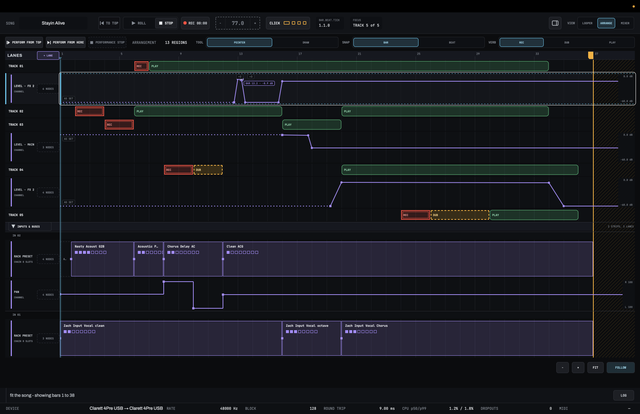
Each track has a lane, instrument tracks included, and you draw regions on it with three verbs: REC, DUB and PLAY. Empty space means the track is stopped. This is the part a hardware looper can’t do without MIDI control from an external sequencer.
Below the regions, automation lanes work the mixer and the instruments while the song plays: faders, pans, mutes, effect parameters and any instrument control. One node can load a whole saved rack into an FX chain, or a synth preset, drum kit or pattern onto an instrument track, and the lane shows its name, so you can read the song as a row of named sections.
Start from the top or from anywhere
Play the arrangement from bar 1 or from wherever the playhead is. Jump to a measure during the performance, synced to the beat.
Mouse or keyboard
Drag a region to move it, drag an edge to trim it, and drag past the edge of the window to scroll. The arrangement has its own undo on ⌘Z, and one drag is one undo step, even if it pushed three other regions out of the way.
Zoom and scroll
Zoom in or out on the arrangement, fit the song to the window, and choose whether the view follows the playhead.
Automate the mixer too
Any strip’s level on each of its four fader destinations, its pan and mute, each effect slot’s bypass, the effect’s controls, and every control on an instrument. An INPUT lane changes which controller an instrument track listens to, at the bar you choose.
A node can load a whole rack
Drop a saved preset into one slot, or a saved rack across a whole chain, at whatever bar or beat you place it. The lane shows the name of what’s loaded until the next change.
Old songs stay the way you left them
A node keeps its own copy of the settings. Edit or delete that preset later and every song that used it still sounds the same.
ALL OR NOTHING
If something’s wrong, you’ll know before you start.
If any region in the arrangement can’t play correctly, nothing starts. The notice row lists each problem on its own line, in plain English, starting with what to fix. And the log shows you every notice message in the session.
Better to find out up front than halfway through the song.
MIXER & EFFECTS
A full mixer behind the loops.
One switch flips between the banks: loop tracks, instruments, inputs, master and buses. Every strip has eight insert slots, instruments included, every chain runs in stereo, and the mixer state and FX chains save with the song.
For effects you get a parametric EQ, compressor, delay, reverb, noise gate, chorus, octave, transparent overdrive, cab, guitar amp, harmony, gain and a tuner. Save a single effect as a preset or a whole chain as a rack, and the arrangement can load either one while you play.
EQ · COMPRESSOR · NOISE GATE · READ FROM YOUR SIGNAL AS YOU PLAY
See what your effects are doing
Every effect draws a picture of what it does, and the picture changes as you move a control. The EQ draws its curve over a live spectrum, and the compressor, gate, gain stage, octave, harmony, reverb and chorus also show readings taken from your signal while you play.
One row of faders, four destinations
MAIN, CUE, FX 1 and FX 2. Pick one and every fader in view controls it, so you’re never hunting for a send knob on each strip.
A headphone mix and two effects buses
CUE is taken before the fader, so you can have more vocals or guitar in your ears while the audience gets the right balance from the main mix. The master and the cue each go out their own pair of outputs, whichever you choose.
Type exact values
You can type a value into any parameter as well as drag it. Type something out of range and LOOM lets you know.
Tempo-synced delay
Switch the delay from FREE to SYNC, pick a division, and it follows the song’s tempo. You know you’re gonna reach for the dotted eighth note option. There’s a PING PONG mode too. The delay and the reverb both have MOD, for a little dimension in the repeats and the tail.
Harmonies in the key of the song
Set the key and scale, and the harmony adds one or two voices to what you sing or play, a third, a fifth or an octave away. The intervals follow the scale the way a backing singer’s would, and your own voice comes through on time. For a song that changes key, automate KEY in the arrange view.
A tuner in the chain
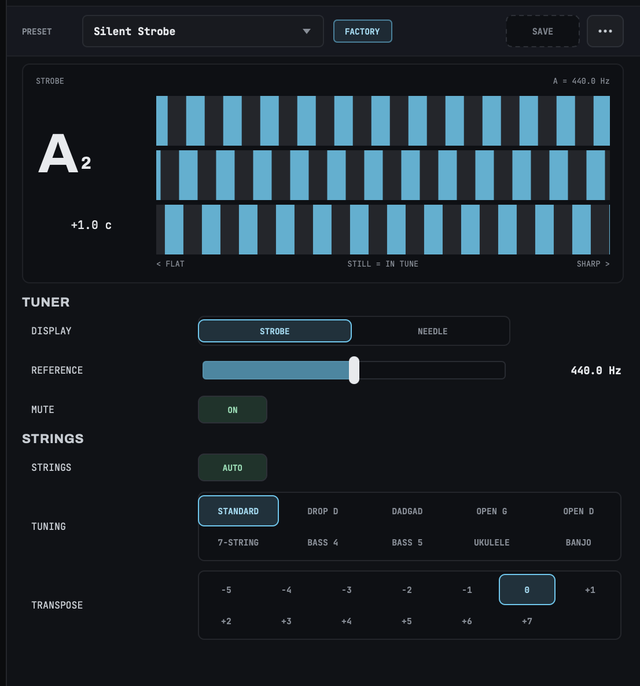
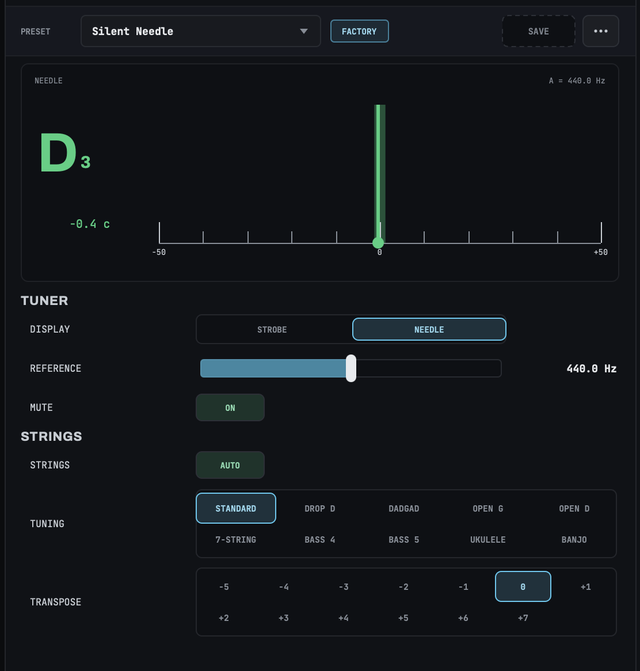
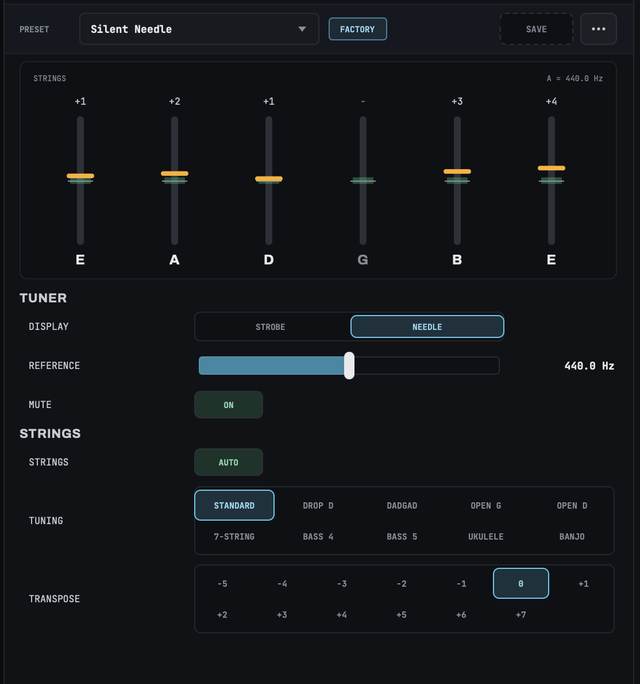
Put the tuner on your input and tune between songs without leaving LOOM. Play one note and read it on a strobe or a needle, or strum all your open strings and see each one at once. It knows standard, drop D, DADGAD, open G, open D, 7-string, 4- and 5-string bass, ukulele and banjo, and turning on MUTE keeps the audience from hearing you tune. With a typical audio interface it reads to about a tenth of a cent.
TUNER · STROBE OR NEEDLE FOR ONE NOTE, EVERY STRING WHEN YOU STRUM
PRESETS & RACKS
Save a sound. Recall it mid-song.
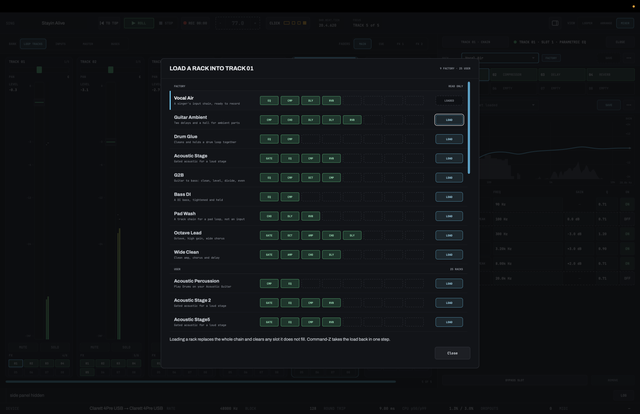
A preset holds one effect’s settings. A rack holds a whole chain: which effect sits in each slot, all their settings, and which slots are bypassed. LOOM comes with a library of both, and the ones you save sit right alongside them. Loading a rack swaps the whole chain at once, and ⌘Z puts it back.
RACK BROWSER · FACTORY AND USER PRESETS · LOADING ONE SWAPS THE WHOLE FX CHAIN
Always know what’s loaded
The FX drawer header bar reads EDITED when you’ve changed a setting, FACTORY for a preset that ships with LOOM, AUTOMATED when a lane is controlling it, and OVERRIDE when you’ve picked a different one by hand during a performance.
Each FX chain has its own undo
⌘Z undoes changes to the chain you’re working on, separately from the arrangement.
No clicks when you swap
Change the effect in a slot while audio is running and LOOM fades the old one out and the new one in over 50 ms.
MIDI MAPPING
Pick a control. Wiggle a knob. Done.
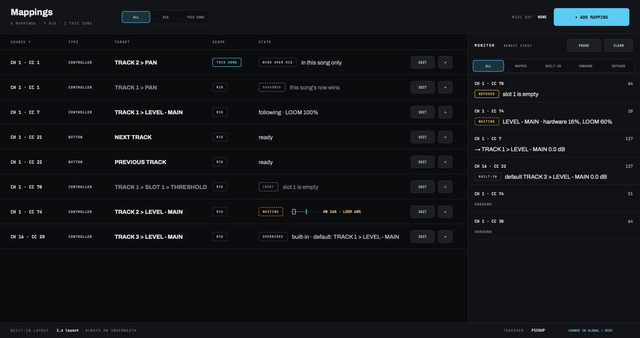
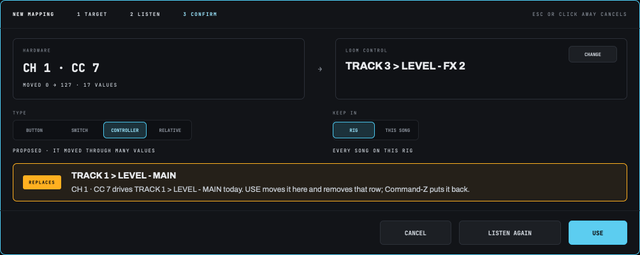
Choose a control in LOOM, then move a knob, fader, pad or key on your hardware. LOOM shows what it heard and suggests how to use it, and from then on that knob drives that control: the synth’s cutoff, a delay’s feedback, a track’s level, or nearly any other control in LOOM.
Your mappings belong to your rig and work in every song. Any one of them can be kept for a single song instead, and that song’s mapping wins.
It tells you before it changes anything
If that knob already drives something, LOOM names it before you confirm, and undo puts it back. A monitor beside your mappings shows every message as it arrives and what it did.
No jumps when a knob is out of place
When a knob isn’t where LOOM’s control is, the control waits until the knob reaches it, and the screen shows where your knob is. Prefer it to jump, or to catch up gradually? Pick that instead.
Faders and pads that follow LOOM
Choose a MIDI output and LOOM sends back each track’s state and every mapped value, so lit pads and motorised or on-screen faders stay where LOOM is. Levels, sends, mutes and the click work with no setup at all. Try it on an iPad with the free TouchOSC layout.
PERFORMANCE RECORDING
Perform the song. Mix it later.
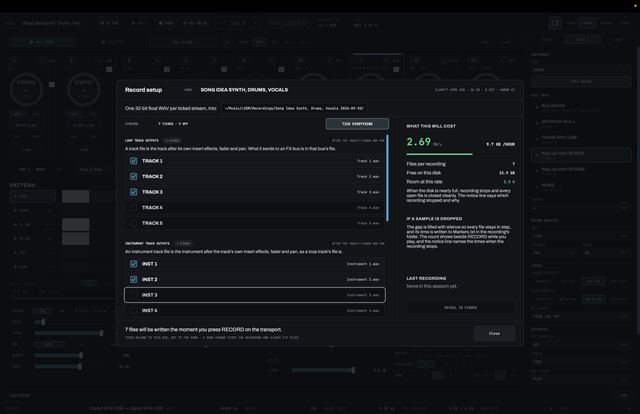
Hit RECORD on the transport and LOOM saves your whole performance as separate WAV files: one per loop track, one per instrument track, one per effects bus, the main mix, and any groups you set up from live inputs or from tracks and buses. Every file starts at the same moment and stays in sync, so you can drop the files into a DAW and it all lines up at zero.
Your takes still save to the song as usual; this is an extra set of files. Play the set once, then balance it against the video later or re-process a guitar that was too loud in the room.
You choose what goes in which file
A group mixes the sources you tick into one stereo file, so you can record your live vocals and instruments to isolated audio files.
See the disk cost up front
Before you record, LOOM shows the megabytes per second, the number of files, your free space, and how many hours of recording that leaves you.
Dropouts get logged
If the disk can’t keep up, LOOM fills the gap with silence in every file at once so they stay in sync, and writes the time and length to a Markers.txt file you can open in any text editor.
FULLY OFFLINE
The venue’s WiFi isn’t your problem.
LOOM never connects to the internet, at launch or at any time after. It doesn’t phone home to check your licence, and it doesn’t download anything. There’s no account or activation server. Your licence is checked right on your Mac.
The only exceptions are two buttons that open your web browser: one to buy a licence and one to check for the latest version. But these are initiated by you only.
0
ACCOUNTS TO MAKE
0
ACTIVATION SERVERS
0
REQUESTS SENT
0
TRACKING
0
SEATS TO DEAUTHORISE
1
LICENCE FILE
AND THE REST
Built for playing live.
LOOPING
Every track, quantized in and out
Start right away or on the next beat, bar or cycle. Stop right away or at the end of the beat, bar or loop. Set it per track or as the song’s default. You can also pre-set a length of up to 32 bars, and the recording closes itself when it gets there.
LAYERS
Overdub or replace, with undo per track
SUM keeps every layer. REPLACE records over what’s there as you play. Each track has one level of undo and redo, separate from the arrangement’s.
MONITORING
You hear yourself right away
Input 1 is live as soon as LOOM opens, and everything else starts muted. You don’t have to arm anything, or even set up a track, first.
INPUTS
Panned takes and stereo pairs
An input’s pan is recorded into the take, as well as applied to what you hear. Link input 1, 3, 5 or 7 to the next one and the pair becomes a single strip with one effects chain across both channels.
YOUR FILES
Every audio take is a WAV you can open
32-bit float, stereo, at your interface’s sample rate, written the moment the take ends. Songs are folders in ~/Music/LOOM, and performance recordings sit next to them.
HARDWARE
Switch interfaces without restarting
Your routing carries over when you switch. If a track still has audio on it, LOOM warns you and gives you the option to save first.
MESSAGES
One notice row, with log history
It stays the same height whether it’s showing a two-line message or nothing, so the layout never jumps. LOG opens everything LOOM has told you this session, and you can select and copy it.
ACCESSIBILITY
Full keyboard control, with spoken updates
Every control is labelled and reachable from the keyboard. This is structural to LOOM’s system design and quality checks. New notices and the focused track’s state are announced, and one switch turns that off for a set.
THE MANUAL
Built into the app
Press ⌘/ to open it. It’s a PDF on your Mac, not a web page, so it opens even with no WiFi. You can also read it here before you download.
MIDI
Play it and run it from MIDI.
Play the synth, drum machine and sampler from any MIDI keyboard or pad controller, and drive every track and the transport from MIDI notes on a channel of their own, 16 by default. Each track, audio or instrument, gets its own octave with the same seven commands in the same order. A MIDI monitor on the bottom bar shows the last message received, in every view, so you can check that LOOM is seeing your controller.
Levels, sends, mutes and the click answer control changes on the same channel, with no setup, and MIDI mapping puts anything else wherever you want it. Choose a MIDI output and LOOM sends each track’s state back to your controller. There’s no MIDI clock, MTC or MMC in or out yet. Clear pads are held for a second, so a stray foot can’t wipe a loop. If your controller is set up for LOOM 1.0, switch MIDI MAP to the 1.0 layout.
TRACK 1
0 – 6
TRACK 2
12 – 18
TRACK 3
24 – 30
TRACK 4
36 – 42
TRACK 5
48 – 54
INST 1
72 – 78
INST 2
84 – 90
INST 3
96 – 102
INST 4
108 – 114
GLOBALS
120 – 125
QUESTIONS
Before you download.
How much does LOOM cost?
LOOM is $99 until December 31, then $149.99. It is a one-time purchase, not a subscription, and the licence never expires. You can try every feature free for 14 days first, with no account and no card.
What Macs does LOOM run on?
LOOM runs on Macs with Apple Silicon, on macOS 13.3 Ventura or later. There is no Intel build and no Windows or iPad version.
Does LOOM need an internet connection?
No. LOOM contains no networking code. It never checks your licence online, never downloads anything and sends nothing, so it works the same on a stage with no WiFi. Privacy in the manual.
Can I use a MIDI foot controller or pad controller with LOOM?
Yes. LOOM answers a fixed set of MIDI notes on channel 16 by default. Each track gets its own octave with the same seven commands, and a range of notes runs the transport and the arrangement. There is no MIDI learn yet. The MIDI note map.
Can I use my own plug-ins in LOOM?
No. For stability, LOOM hosts no third-party plug-ins. It has its own synth, drum machine and sampler, and its own effects: parametric EQ, compressor, delay, reverb, noise gate, chorus, octave, transparent overdrive, cab, guitar amp, harmony, gain and a tuner.
Can I record a live looping set as separate tracks?
Yes. RECORD saves the whole performance as separate WAV files that start at the same moment: one per loop track, one per instrument track, one per effects bus, the main mix, and any groups you set up. Drop them into a DAW and they line up at zero. Where your recordings live.
How is LOOM different from a hardware looper?
LOOM works like a loop pedal when you play it by hand, and it also has an arrange view. You draw REC, DUB and PLAY regions on a timeline, and the song presses the looper's buttons for you while you play over it. The arrange view.
GET LOOM
Fourteen days, everything unlocked.
No watermarks, no session limits, no account. When the trial’s up, your licence is a small file you open once. LOOM checks it on your Mac at launch and never again, so a licence check will never interrupt you mid-set.
STEP ONE
Download and play
Download the disk image, drag LOOM into Applications, and open it from the Applications folder.
$99 launch price until December 31, then $149.99 · one-time
Checkout is handled by Polar. You’ll get a licence key, which you exchange for your licence file. Hang on to that file: it never expires, and moving to a new Mac is just a matter of copying it over.
Every key LOOM answers to, in a light version for printing and a dark one for your screen. You’ll also get an email when there’s a new tutorial or release. Unsubscribe any time.